nexspence

Free, open-source universal artifact repository manager
A full-featured self-hosted alternative to Sonatype Nexus Repository
     
What is Nexspence?
Nexspence is a self-hosted artifact repository manager that supports 12 package formats, three repository types (hosted, proxy, group), fine-grained RBAC, SSO via OIDC/LDAP, audit logging, S3-compatible storage, and a modern dark-theme web UI — all in a single binary backed by PostgreSQL.
It exposes the full Sonatype Nexus v1 REST API at /service/rest/v1/ for drop-in compatibility with existing CI/CD pipelines, Maven/Gradle settings, and npm/pip configurations.
Screenshots
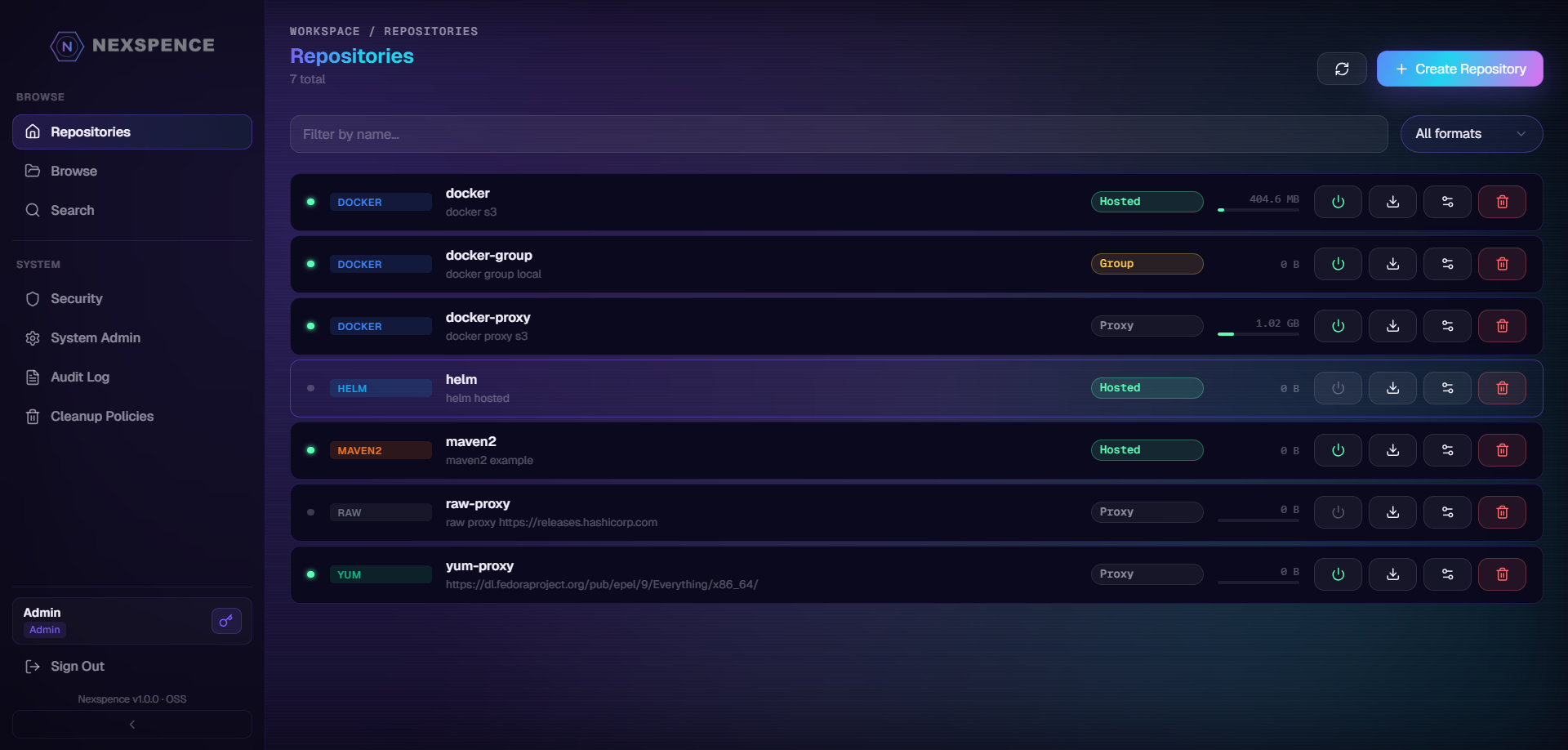
Dashboard & Repositories
 |
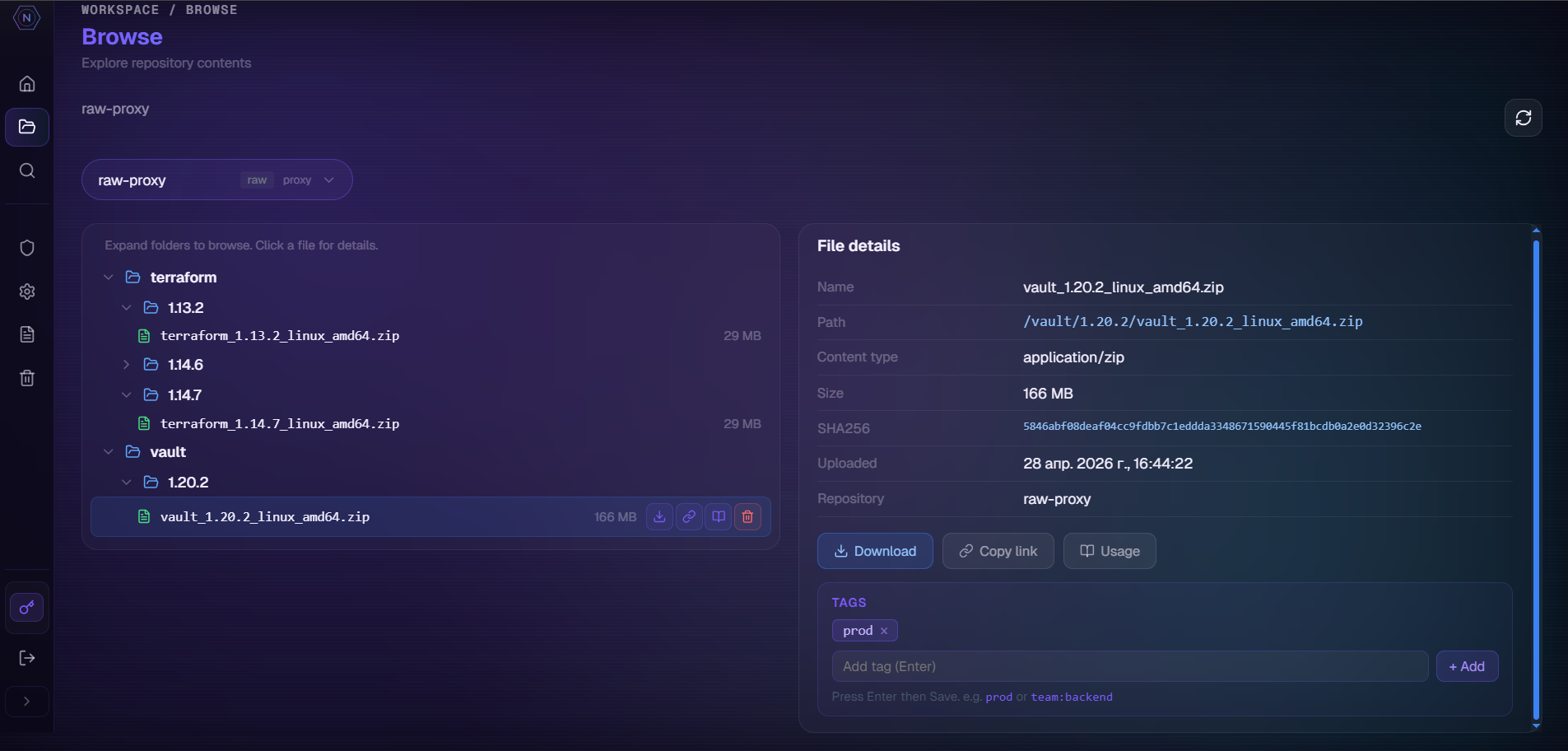 |
| Repositories list | Browse tree view |
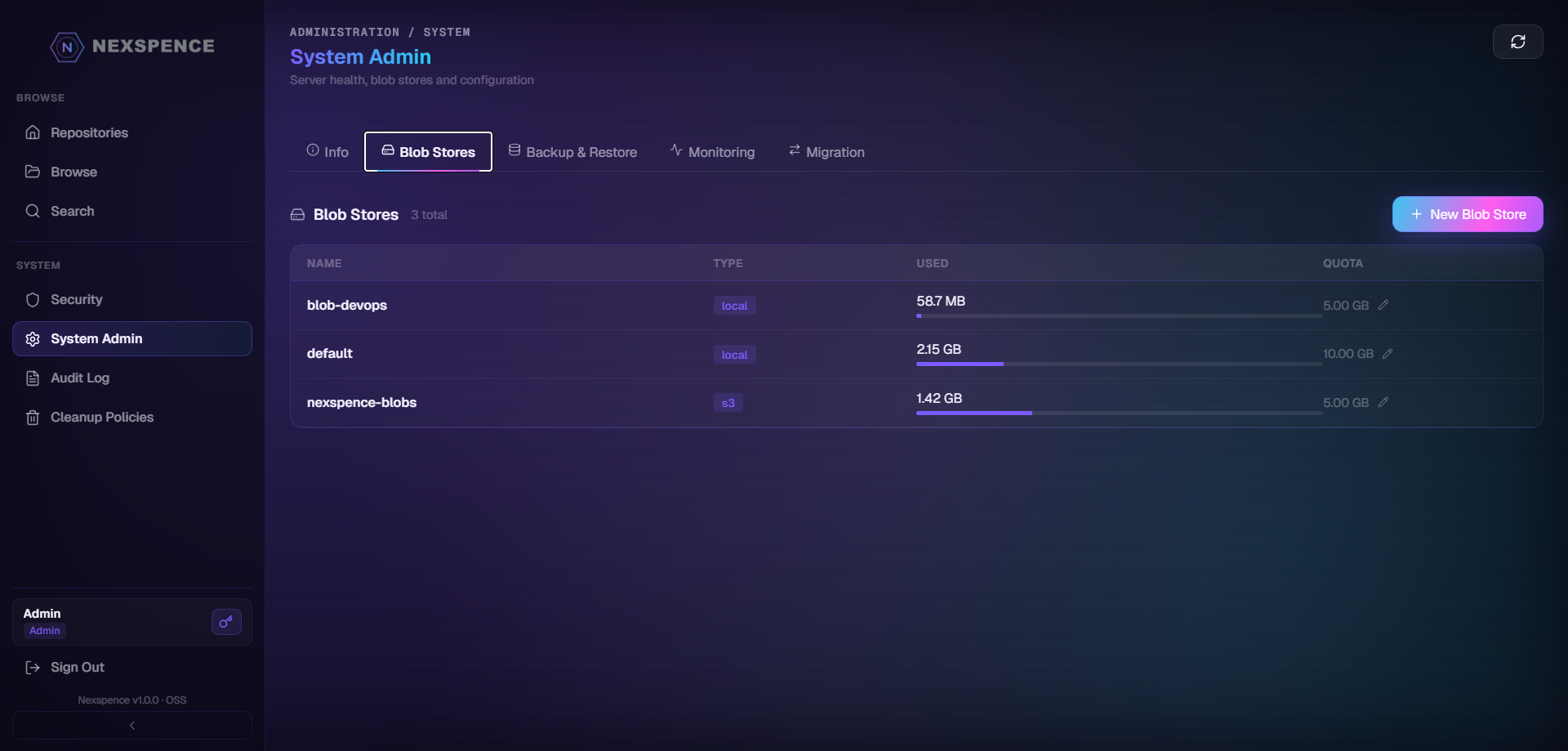
Admin & Security
 |
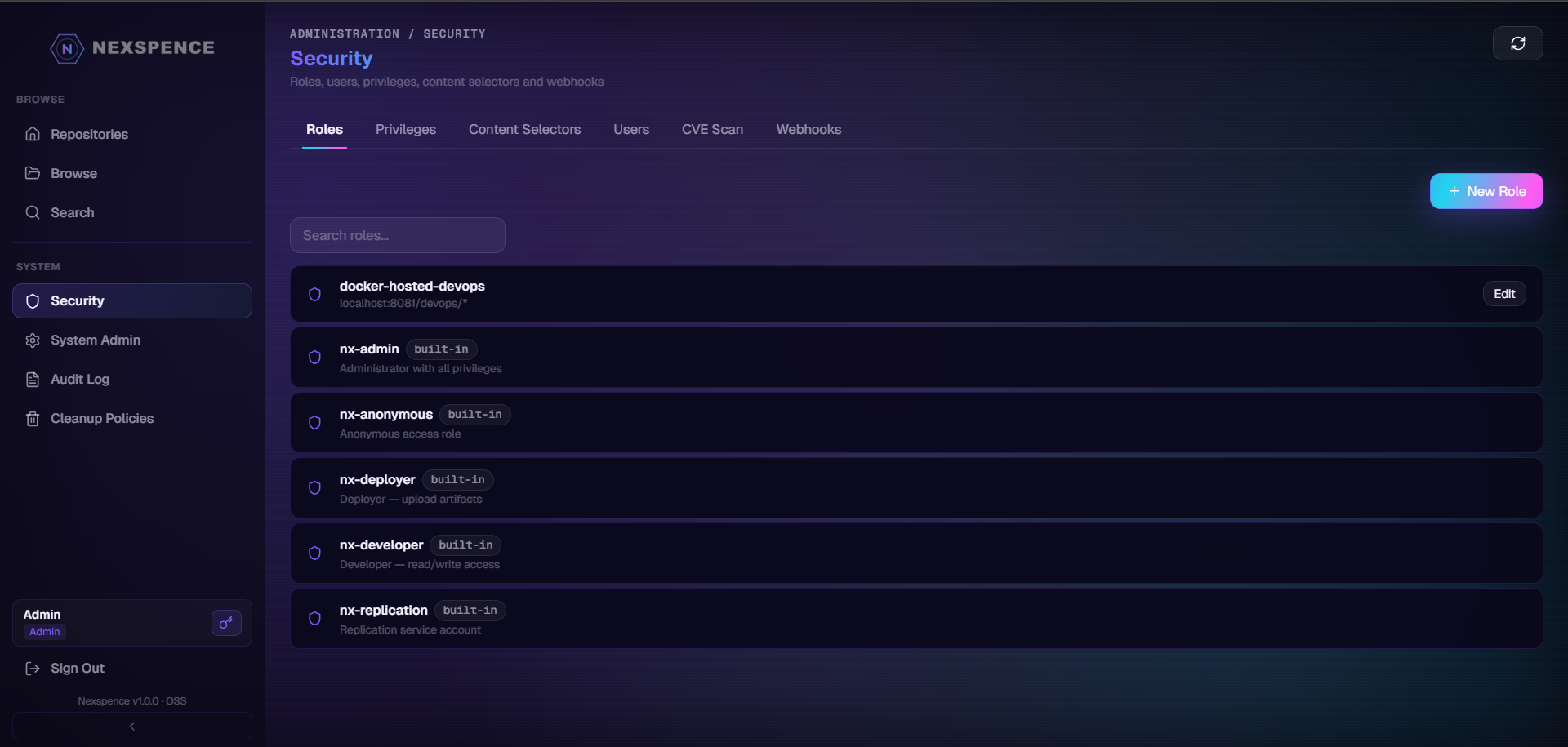 |
| Blob stores — S3 + local with connection test | Roles, privileges, content selectors |
Cleanup & Search
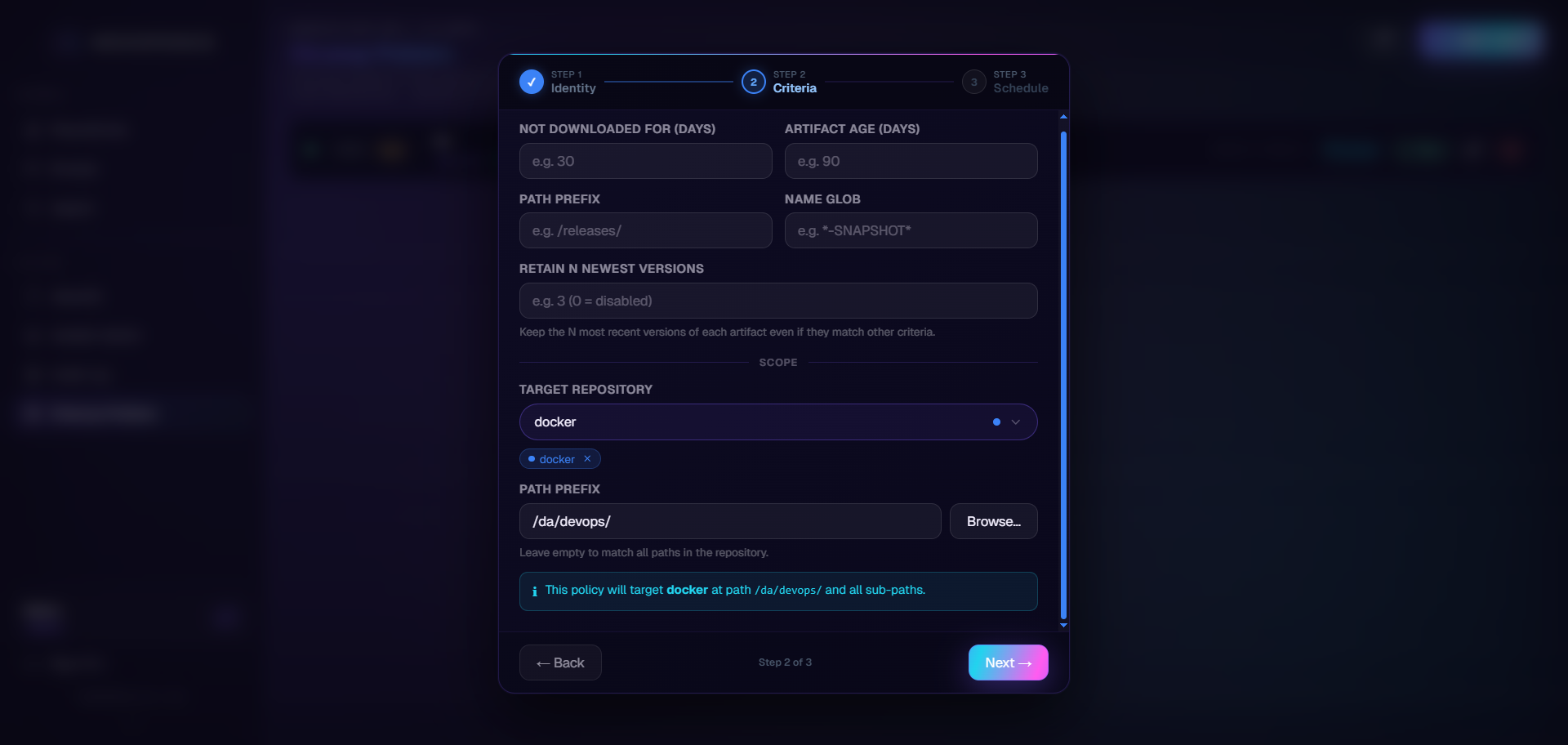 |
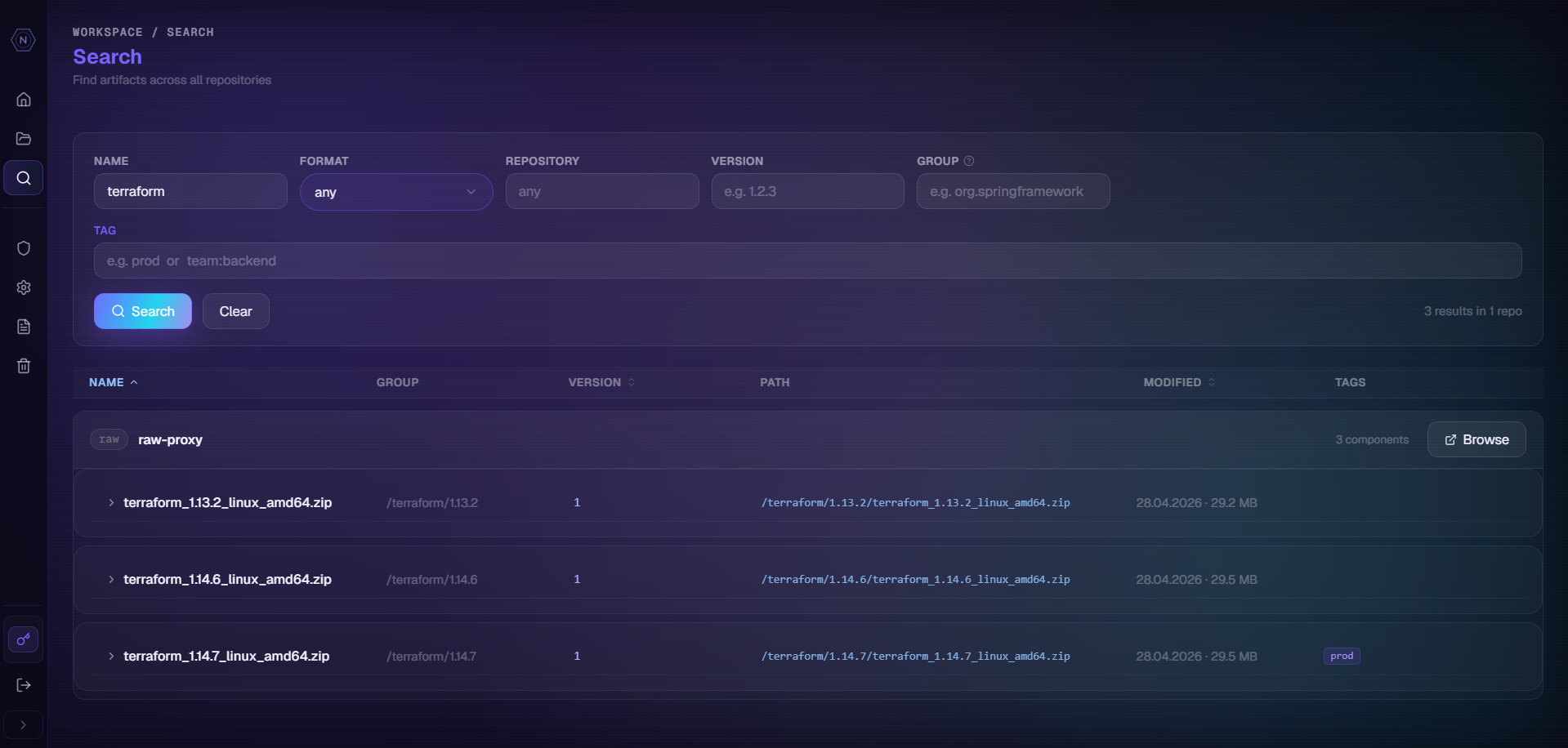 |
| Cleanup policies with dry-run preview | Full-text component search |
Quick Start
Prerequisites
- Docker 24+
- Docker Compose v2 (bundled with Docker Desktop)
1. Clone the repository
git clone https://github.com/skensell201/nexspence
cd nexspence
The repository includes ready-to-use files in the root:
| File | Purpose |
|---|---|
docker-compose.yml |
Single-node: PostgreSQL + Nexspence (optional Keycloak / MinIO profiles) |
docker-compose.ha.yml |
HA cluster: 2 × Nexspence + nginx + Redis + MinIO + PostgreSQL |
config.yaml |
Full application configuration — mounted read-only into the container |
2. Configure before first launch
Open config.yaml and change at minimum these two values:
auth:
  jwt_secret: "CHANGE_ME_AT_LEAST_32_CHARACTERS_LONG"   # ← replace with a random 32+ char string

bootstrap:
  admin_password: "changeme"   # ← your initial admin password
Everything else works out of the box for a local setup. Environment variables take precedence over config.yaml:
# Override admin password without touching config.yaml
NEXSPENCE_BOOTSTRAP_ADMIN_PASSWORD=mysecret docker compose up -d
3. Start the stack
docker compose up -d
Docker Compose will:
- Pull
postgres:16-alpineandnexspence/nexspence:latest - Start PostgreSQL and wait for it to become healthy
- Start Nexspence — it auto-migrates the schema and bootstraps the admin account on first run
Check that everything is up:
docker compose ps
docker compose logs -f nexspence
4. Open the web UI
| Service | URL | Default credentials |
|---|---|---|
| Web UI & REST API | http://localhost:8081 | admin / changeme |
| Docker registry | localhost:5000 | same credentials |
| PostgreSQL | localhost:5437 | nexspence / nexspence |
Change the default password immediately after the first login via Administration → Security → Users.
5. Stop and clean up
# Stop containers (data is preserved in Docker volumes)
docker compose down

# Stop AND remove all data volumes (full reset)
docker compose down -v
Configuration
config.yaml is mounted into the container at /app/config.yaml. All keys can be overridden via environment variables using the pattern NEXSPENCE_<SECTION>_<KEY> (uppercase, underscore separator).
HTTP server
http:
  addr: ":8081"
  read_timeout_sec: 1800
  write_timeout_sec: 1800
  max_body_mb: 1024
  base_url: "http://localhost:8081"   # change to your public hostname in production
  tls:
    enabled: false
    cert_file: ""
    key_file: ""
Database
database:
  dsn: "postgres://nexspence:nexspence@localhost:5437/nexspence?sslmode=disable"
  max_conns: 100
  min_conns: 5
  max_idle_sec: 300
When running via Docker Compose the DSN is overridden by the
NEXSPENCE_DATABASE_DSNenvironment variable — the container connects to thepostgresservice, notlocalhost.
Storage
storage:
  default_type: "local"   # "local" or "s3"
  local:
    base_path: "./data/blobs"
  # s3:
  #   bucket: "nexspence-blobs"
  #   region: "us-east-1"
  #   endpoint: "http://minio:9000"    # MinIO inside Docker Compose
  #   access_key_id: ""
  #   secret_access_key: ""
  #   force_path_style: true            # required for MinIO / non-AWS S3
Authentication
auth:
  jwt_secret: "CHANGE_ME_AT_LEAST_32_CHARACTERS_LONG"
  jwt_expiry_hours: 24
  anonymous_enabled: true      # allow read-only access to public repos without login
  password_min_length: 8
  bcrypt_cost: 12
  token_max_days: 180          # maximum lifetime of user API tokens (nxs_*)

bootstrap:
  admin_username: "admin"
  admin_password: "changeme"
  admin_email: "admin@example.com"
  admin_first_name: "Admin"
LDAP / Active Directory (optional)
ldap:
  enabled: false
  host: "ldap.example.com"
  port: 636                    # 636 for LDAPS, 389 for plain/STARTTLS
  use_tls: true
  bind_dn: "CN=svc-nexspence,OU=ServiceAccounts,DC=example,DC=com"
  bind_password: ""            # set via NEXSPENCE_LDAP_BIND_PASSWORD env var
  search_base: "DC=example,DC=com"
  search_filter: "(sAMAccountName={0})"   # AD; for OpenLDAP use: (uid={0})
  auto_create_users: true
  admin_group: ""              # group CN whose members get nx-admin role
OIDC / OAuth2 SSO (optional)
Supports Keycloak, Google Workspace, Microsoft Entra ID, Okta.
oidc:
  enabled: false
  display_name: "SSO"          # button label: "Sign in with {display_name}"
  issuer: ""                   # e.g. "https://kc.example.com/realms/nexspence"
  client_id: ""
  client_secret: ""            # set via NEXSPENCE_OIDC_CLIENT_SECRET env var
  redirect_url: ""             # "https://nexspence.example.com/api/v1/auth/oidc/callback"
  frontend_base_url: ""        # "https://nexspence.example.com"
  provisioning: "jit"          # jit | allowlist | manual
  admin_group: ""
Optional Services
The docker-compose.yml includes commented-out blocks for two optional services.
Keycloak (local OIDC provider)
docker compose --profile keycloak up -d
Admin UI: http://localhost:8180 (admin / admin)
After starting, create a realm nexspence, add a client nexspence (confidential, redirect URI: http://localhost:8081/api/v1/auth/oidc/callback), then enable OIDC in config.yaml:
oidc:
  enabled: true
  issuer: "http://localhost:8180/realms/nexspence"
  client_id: "nexspence"
  client_secret: "<your-client-secret>"
  redirect_url: "http://localhost:8081/api/v1/auth/oidc/callback"
  frontend_base_url: "http://localhost:8081"
MinIO (S3-compatible blob store)
docker compose --profile minio up -d
Switch storage to S3 in config.yaml:
storage:
  default_type: "s3"
  s3:
    bucket: "nexspence-blobs"
    region: "us-east-1"
    endpoint: "http://minio:9000"
    access_key_id: "minioadmin"
    secret_access_key: "minioadmin"
    force_path_style: true
MinIO console: http://localhost:9001 (minioadmin / minioadmin)
High Availability (multi-node cluster)
docker compose -f docker-compose.ha.yml up --build
Starts: 2 × Nexspence nodes + nginx (round-robin on :8080) + Redis + MinIO + PostgreSQL.
All nodes are stateless at the application layer — shared state lives in PostgreSQL, Redis, and S3.
Enable Redis in config.yaml (or via env vars) for each node:
redis:
  enabled: true
  addr: "redis:6379"
| Env var | Default | Description |
|---|---|---|
NEXSPENCE_REDIS_ENABLED |
false |
Enable Redis (required for HA) |
NEXSPENCE_REDIS_ADDR |
localhost:6379 |
Redis address |
See docs/ha-setup.md for the full HA guide including Kubernetes probe examples.
Supported Package Formats
| Format | Hosted | Proxy | Group |
|---|---|---|---|
| Maven 2 / 3 | ✓ | ✓ | ✓ |
| npm | ✓ | ✓ | ✓ |
| PyPI | ✓ | ✓ | ✓ |
| Go modules (GOPROXY v2) | ✓ | ✓ | ✓ |
| Docker / OCI | ✓ | ✓ | ✓ |
| NuGet v2 / v3 | ✓ | ✓ | ✓ |
| Helm charts | ✓ | ✓ | ✓ |
| Cargo (Rust) | ✓ | ✓ | ✓ |
| APT (Debian/Ubuntu) | ✓ | ✓ | — |
| Yum / RPM | ✓ | ✓ | — |
| Conan (C/C++) | ✓ | ✓ | — |
| Raw files | ✓ | ✓ | ✓ |
Feature Highlights
Authentication & Access Control
- Local accounts — JWT bearer tokens, bcrypt passwords
- LDAP / Active Directory — JIT user provisioning, group → role mapping, admin-group sync
- OIDC / OAuth 2.0 SSO — Keycloak, Google Workspace, Microsoft Entra ID, Okta; Authorization Code + PKCE
- User API tokens —
nxs_…prefixed, SHA-256 hashed in DB; usable as Bearer or HTTP Basic password - RBAC — Roles, Privileges, Content Selectors (CEL expressions for path/format scoping)
Storage
- Local filesystem — default, zero configuration
- S3-compatible — AWS S3, MinIO, Ceph; configurable per blob store; connection test endpoint
- Per-repository blob store routing — each repository can use a different physical blob store
- Storage quotas — per blob store and per repository; enforced on upload
Repository Management
- Hosted — direct artifact upload and storage
- Proxy — transparent remote caching (cache-miss fetches from upstream, stores locally)
- Group — ordered union of hosted + proxy repos under a single URL
- Cleanup policies — by age, last-downloaded, format; retain-N-versions; cron scheduler; dry-run preview
- Component tags — free-form text tags on components, searchable via the API and UI
High Availability
- Multi-node clustering — stateless nodes behind any load balancer; all shared state in PostgreSQL + Redis + S3
- Redis integration — shared DockerV2Auth anonymous-check cache (
nexspence:docker:anon_allowed, 30s TTL); graceful degradation when Redis is unavailable (falls back to single-node in-process cache) - Distributed locking — cleanup runs and blob-store migrations acquire per-operation Redis locks so only one node executes at a time;
ErrLockHeld= silent skip (cleanup) or user-facing error (migration) - Health probes —
GET /healthz(liveness, always 200) andGET /readyz(readiness, parallel DB + Redis ping, 503 on failure); registered before auth middleware for k8s/load-balancer access - Reference deployment —
docker-compose.ha.yml: 2 × Nexspence + nginx (least_conn) + Redis + MinIO + PostgreSQL
Backup & Migration
- Per-repository export — streaming
.tar.gzdownload (metadata + blobs) - Per-repository import — multipart upload; skip or rename conflict resolution; deduplication by SHA-256
- Full system backup / restore — complete database + blob export
- Live migration from Nexus — import repositories, users, roles, cleanup policies from a running Nexus/Pro instance
Developer Experience
- Nexus v1 REST API —
/service/rest/v1/compatible; drop-in replacement - Full-text search — PostgreSQL tsvector across components and assets
- Browse UI — tree view for raw and Docker repositories; file details with download, copy-link, and usage examples
- Audit log — every API action logged; filterable by date/user/path; NDJSON streaming export; 90-day retention
- Webhooks —
artifact.published,artifact.deleted,repo.created,repo.updated,repo.deletedevents; HMAC-SHA256 signatures - Vulnerability scanning — Trivy (Docker images) + OSV.dev (Maven/npm/PyPI/Cargo); CVE results cached in
scan_resultsDB table; aggregated dashboard with bulk re-scan - Dark glassmorphism UI — sidebar collapse/expand; tabbed admin pages; wizard-style create flows
Uploading Artifacts
All artifact endpoints follow the pattern:
http://localhost:8081/repository/<repo-name>/<format-specific-path>
Create a hosted repository first (UI → Repositories → New Repository, or via API):
curl -u admin:changeme -X POST http://localhost:8081/service/rest/v1/repositories/raw/hosted \
  -H 'Content-Type: application/json' \
  -d '{"name":"my-raw","online":true,"storage":{"blobStoreName":"default","strictContentTypeValidation":false}}'
Raw (any file)
# Upload
curl -u admin:changeme -X PUT \
  http://localhost:8081/repository/my-raw/path/to/myfile.zip \
  --upload-file myfile.zip

# Download
curl -O http://localhost:8081/repository/my-raw/path/to/myfile.zip

# Delete
curl -u admin:changeme -X DELETE \
  http://localhost:8081/repository/my-raw/path/to/myfile.zip
Maven 2 / 3
Configure ~/.m2/settings.xml:
<settings>
  <servers>
    <server>
      <id>nexspence</id>
      <username>admin</username>
      <password>changeme</password>
    </server>
  </servers>
</settings>
In pom.xml:
<distributionManagement>
  <repository>
    <id>nexspence</id>
    <url>http://localhost:8081/repository/my-maven-hosted/</url>
  </repository>
  <snapshotRepository>
    <id>nexspence</id>
    <url>http://localhost:8081/repository/my-maven-snapshots/</url>
  </snapshotRepository>
</distributionManagement>
mvn deploy
npm
npm config set registry http://localhost:8081/repository/my-npm/
npm login --registry=http://localhost:8081/repository/my-npm/
npm publish --registry=http://localhost:8081/repository/my-npm/
npm install my-package --registry=http://localhost:8081/repository/my-npm/
PyPI
# Upload with twine
pip install twine
twine upload \
  --repository-url http://localhost:8081/repository/my-pypi/ \
  --username admin --password changeme \
  dist/*

# Install with pip
pip install my-package \
  --index-url http://admin:changeme@localhost:8081/repository/my-pypi/simple/ \
  --trusted-host localhost
Go modules (GOPROXY)
export GOPROXY=http://localhost:8081/repository/my-go/,direct
export GONOSUMCHECK=localhost
go get github.com/some/module@v1.2.3
Docker / OCI
# Add to /etc/docker/daemon.json: {"insecure-registries": ["localhost:8081"]}

docker login localhost:8081 -u admin -p changeme

# Push
docker tag myimage:latest localhost:8081/repository/my-docker/myimage:latest
docker push localhost:8081/repository/my-docker/myimage:latest

# Pull
docker pull localhost:8081/repository/my-docker/myimage:latest
NuGet
nuget sources add \
  -Name Nexspence \
  -Source http://localhost:8081/repository/my-nuget/index.json \
  -Username admin -Password changeme

nuget push MyPackage.1.0.0.nupkg -Source Nexspence -ApiKey changeme
dotnet add package MyPackage --source http://localhost:8081/repository/my-nuget/index.json
Helm
helm repo add nexspence \
  http://localhost:8081/repository/my-helm/ \
  --username admin --password changeme

helm repo update
helm install my-release nexspence/my-chart

# Push chart
helm plugin install https://github.com/chartmuseum/helm-push
helm cm-push my-chart-1.0.0.tgz nexspence
Cargo (Rust)
Add to ~/.cargo/config.toml:
[registries.nexspence]
index = "sparse+http://localhost:8081/repository/my-cargo/"
cargo publish --registry nexspence
cargo add my-crate --registry nexspence
APT (Debian / Ubuntu)
echo "deb [trusted=yes] http://localhost:8081/repository/my-apt/ stable main" \
  | sudo tee /etc/apt/sources.list.d/nexspence.list
sudo apt update && sudo apt install my-package

# Upload .deb
curl -u admin:changeme -X PUT \
  "http://localhost:8081/repository/my-apt/pool/main/my-package_1.0.0_amd64.deb" \
  --upload-file my-package_1.0.0_amd64.deb
Yum / DNF (RPM)
Configure /etc/yum.repos.d/nexspence.repo:
[nexspence]
name=Nexspence
baseurl=http://localhost:8081/repository/my-yum/
enabled=1
gpgcheck=0
sudo dnf install my-package

# Upload .rpm
curl -u admin:changeme -X PUT \
  "http://localhost:8081/repository/my-yum/my-package-1.0.0.x86_64.rpm" \
  --upload-file my-package-1.0.0.x86_64.rpm
Conan (C/C++)
conan remote add nexspence http://localhost:8081/repository/my-conan/
conan user admin -r nexspence -p changeme
conan upload my-lib/1.0.0@ -r nexspence --all
conan install my-lib/1.0.0@ -r nexspence
Proxy Repositories
A proxy repository caches artifacts from an upstream registry on first request. Subsequent requests are served locally without hitting upstream again.
How it works:
- Client requests an artifact
- Cache hit → served from local blob store immediately
- Cache miss → Nexspence fetches from
remote_url, streams to client, persists locally (zero-copy) - Mutations (push/delete) are rejected with
405 Method Not Allowed
Create proxy repositories (API)
# Maven Central
curl -u admin:changeme -X POST \
  http://localhost:8081/service/rest/v1/repositories/maven2/proxy \
  -H 'Content-Type: application/json' \
  -d '{"name":"maven-central","type":"proxy","format":"maven2","proxy_config":{"remote_url":"https://repo1.maven.org/maven2/"}}'

# npm registry
curl -u admin:changeme -X POST \
  http://localhost:8081/service/rest/v1/repositories/npm/proxy \
  -H 'Content-Type: application/json' \
  -d '{"name":"npm-proxy","type":"proxy","format":"npm","proxy_config":{"remote_url":"https://registry.npmjs.org/"}}'

# PyPI
curl -u admin:changeme -X POST \
  http://localhost:8081/service/rest/v1/repositories/pypi/proxy \
  -H 'Content-Type: application/json' \
  -d '{"name":"pypi-proxy","type":"proxy","format":"pypi","proxy_config":{"remote_url":"https://pypi.org/"}}'

# Docker Hub
curl -u admin:changeme -X POST \
  http://localhost:8081/service/rest/v1/repositories/docker/proxy \
  -H 'Content-Type: application/json' \
  -d '{"name":"docker-hub","type":"proxy","format":"docker","proxy_config":{"remote_url":"https://registry-1.docker.io/"}}'

# Helm / Bitnami
curl -u admin:changeme -X POST \
  http://localhost:8081/service/rest/v1/repositories/helm/proxy \
  -H 'Content-Type: application/json' \
  -d '{"name":"bitnami","type":"proxy","format":"helm","proxy_config":{"remote_url":"https://charts.bitnami.com/bitnami/"}}'
Proxy format support
| Format | Proxy | Default upstream |
|---|---|---|
| maven2 | ✓ | https://repo1.maven.org/maven2/ |
| npm | ✓ | https://registry.npmjs.org/ |
| pypi | ✓ | https://pypi.org/ |
| go | ✓ | https://proxy.golang.org/ |
| docker | ✓ | https://registry-1.docker.io/ |
| helm | ✓ | https://charts.bitnami.com/bitnami/ |
| nuget | ✓ | https://api.nuget.org/v3/ |
| cargo | ✓ | https://index.crates.io/ |
| apt | ✓ | http://archive.ubuntu.com/ubuntu/ |
| yum | ✓ | https://dl.fedoraproject.org/pub/epel/… |
| conan | ✓ | https://center2.conan.io/ |
| raw | ✓ | any HTTP server |
Group Repositories
A group repository exposes a single URL that aggregates hosted and/or proxy repositories of the same format. Members are tried in order; the first non-404 response is returned.
- Read-only: GET and HEAD only — PUT/POST/DELETE return
405 - Browse & Search: Nexspence expands group → member names and queries across all members
- Tracing: Responses include
X-Nexspence-Sourcewith the member that served the request
# npm group over hosted + proxy
curl -u admin:changeme -X POST \
  http://localhost:8081/service/rest/v1/repositories/npm/group \
  -H 'Content-Type: application/json' \
  -d '{
    "name": "npm-all",
    "type": "group",
    "format": "npm",
    "formatConfig": { "member_names": ["npm-private", "npm-proxy"] }
  }'

npm install lodash --registry http://localhost:8081/repository/npm-all/
REST API
Nexspence implements the Nexus v1 REST API — existing Nexus clients work without modification.
API paths
| Path prefix | Purpose |
|---|---|
/service/rest/v1/ |
Nexus v1 REST — drop-in compatible |
/service/rest/beta/ |
Nexus beta endpoints |
/api/v1/ |
Nexspence-native API (migration, backup, extended admin) |
/repository/:name/* |
Artifact protocol endpoints |
/v2/ |
OCI Distribution Spec v2 (Docker) |
Key endpoints
GET  /healthz                                          # Liveness probe (always 200)
GET  /readyz                                           # Readiness probe (DB + Redis, 503 on failure)
GET  /api/v1/status                                    # Application status
GET  /api/v1/metrics                                   # Metrics (public)
POST /api/v1/login                                     # JWT login

GET  /service/rest/v1/repositories                     # List repos
POST /service/rest/v1/repositories/:format/hosted      # Create hosted repo
POST /service/rest/v1/repositories/:format/proxy       # Create proxy repo
POST /service/rest/v1/repositories/:format/group       # Create group repo

GET  /service/rest/v1/search?name=foo                  # Search components
GET  /service/rest/v1/search/assets                    # Search assets

GET  /service/rest/v1/security/users                   # List users
GET  /service/rest/v1/security/roles                   # List roles
GET  /service/rest/v1/audit                            # Audit log

GET  /service/rest/v1/cleanup-policies                 # List cleanup policies
POST /service/rest/v1/cleanup-policies/:id/run         # Run policy now

GET  /api/v1/repositories/:name/export                 # Export repo as .tar.gz
POST /api/v1/repositories/import                       # Import repo from .tar.gz
Full OpenAPI 3.1 spec: docs/api-spec.yaml
Architecture
                         ┌─────────────────────┐
                         │   Load Balancer      │  (nginx / k8s Ingress / ALB)
                         └──────────┬──────────┘
                    ┌───────────────┴───────────────┐
                    ▼                               ▼
┌────────────┐  JWT/Basic  ┌──────────────────┐   ┌──────────────────┐
│  Client    │ ──────────▶ │  Nexspence node 1 │   │  Nexspence node 2│  (HA)
│ (curl/mvn/ │             │  Gin + Auth +     │   │  identical       │
│  pip/npm…) │ ◀────────── │  Audit + RBAC     │   └────────┬─────────┘
└────────────┘             └────────┬──────────┘            │
                                    │                        │
                    ┌───────────────▼────────────────────────▼──────┐
                    │           Shared State                          │
                    │  ┌──────────────┐  ┌─────────┐  ┌──────────┐ │
                    │  │  PostgreSQL  │  │  Redis  │  │  S3/MinIO│ │
                    │  │  (all data)  │  │  (locks │  │  (blobs) │ │
                    │  └──────────────┘  │  cache) │  └──────────┘ │
                    │                    └─────────┘                │
                    └────────────────────────────────────────────────┘
Tech Stack
| Layer | Technology |
|---|---|
| Backend | Go 1.22 — Gin, pgx v5, golang-migrate, go-oidc v3, zap |
| Frontend | React 18, TypeScript 5, Vite, Zustand, React Query, Axios |
| Database | PostgreSQL 16+ (pgx, goose migrations) |
| Storage | Local filesystem · S3-compatible (AWS S3, MinIO, Ceph) |
| Auth | JWT + bcrypt · LDAP/AD · OIDC + PKCE · API tokens |
| HA / Clustering | Redis (go-redis v9) — distributed locks + shared cache |
| Scanning | Trivy (Docker CVE) · OSV.dev (Maven / npm / PyPI / Cargo) |
| Container | Docker + Docker Compose |
Roadmap
| Phase | Feature | Status |
|---|---|---|
| 1–22 | Core: repos, RBAC, formats, blob stores, proxy, group, cleanup | ✓ complete |
| 25 | Audit log: detailed events, NDJSON export, 90-day partition rotation | ✓ complete |
| 26 | Docker /v2/ anonymous fallthrough + OCI-shaped auth errors |
✓ complete |
| 28 | OIDC/OAuth2 SSO — Keycloak, Google, Entra, Okta; PKCE; JIT/allowlist provisioning | ✓ complete |
| 38 | Migration tab — live Nexus import with scope selection + job history | ✓ complete |
| 39 | Sidebar collapse — icon rail (260px ↔ 48px, persisted) | ✓ complete |
| 40 | Stepped wizard — Create Repository / Migration Job / Cleanup Policy | ✓ complete |
| 41–47 | UI polish: token expiry, transfer lists, empty states, a11y, z-index | ✓ complete |
| 48–51 | Blob store groups, S3 routing, repo blob-store migration, group writes, Docker subdomain connector | ✓ complete |
| 53 | High Availability — Redis cluster mode, distributed locks, /healthz + /readyz, docker-compose.ha.yml |
✓ complete |
| 54 | Vulnerability dashboard — OSV.dev for Maven/npm/PyPI/Cargo, scan_results table, bulk re-scan |
✓ complete |
| next | SBOM generation, cosign image signing, Terraform provider | planned |
| next | Prometheus metrics endpoint, OpenTelemetry traces | planned |
| next | nexctl CLI, blob GC, content replication |
planned |
License
AGPLv3 — see LICENSE
AGPLv3 License · Built with Go + React